What is a Voided Check and How Do I Get One?
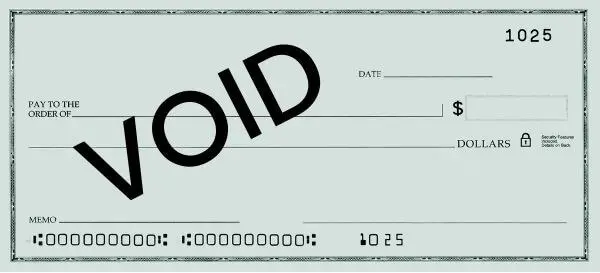
A voided check is a check with the word “VOID” written in large letters across the front. Voiding a check makes it unusable for payments or withdrawals, but it still shows your bank’s routing number and your account number, which is exactly why it’s used to share your banking details for direct deposit and automatic payments.
If you’ve been asked for one and don’t keep a checkbook around, you’re not alone and you have options, including generating one online. Below, we cover what a voided check is, what it looks like, how to void one correctly, and how to get one without paper checks.
Table of Contents
Key Takeaways
- A voided check is a regular check with “VOID” written across it. It can’t be cashed, but it still displays your routing and account numbers.
- Its purpose is to safely share verified bank details, most often to set up direct deposit or automatic payments.
- To void a check, write “VOID” in large letters across the front, don’t cover the numbers along the bottom, and don’t sign it.
- No checkbook? You can generate a voided check online, request one from your bank, or use a direct deposit authorization form instead.
What is a Voided Check?
A voided check is a regular check that has the word “VOID” written across it in large, bold letters. It means the check can’t be used to withdraw money or make a payment. But why would anyone need a check that doesn’t work for payments?
The answer lies in the information a check carries. Even after it’s voided, a check still shows essential banking information (your bank account number and routing number) so it’s a safe, accurate way to hand those details to someone who needs them, without the risk of the check being cashed. (You may occasionally see a voided check called an “invalid check” or “nullified check,” but “voided check” is the standard term.)
Voided checks are most often required by employers setting up direct deposit, by creditors arranging loan payments, or by companies setting up automatic bill pay.
What Does a Voided Check Look Like?
A voided check looks like an ordinary check with “VOID” written across the front in large letters. The word is big enough to make the check unusable, but it’s placed so the important details underneath stay readable. You can reference the image above:
- Your name and address (top-left corner)
- The bank’s routing number — a nine-digit number in the bottom-left of the MICR line
- Your account number — just to the right of the routing number
- The check number — the shorter number on the far right
Notice that “VOID” is written across the body of the check but does not cover the numbers along the bottom. That’s the key: the check is unusable for payment, yet every detail a payer needs is still legible.
When Do You Need a Voided Check?
A voided check is a safe, reliable way to provide your banking details without the risk of unauthorized withdrawals. The most common situations:
1. Setting Up Direct Deposit:
When you start a new job or set up a salary deposit, your employer often asks for a voided check to route your pay into your checking account.


2. Arranging Automatic Bill Payments:
For recurring payments like utilities, loans, or subscriptions, companies use a voided check to set up an ACH (Automated Clearing House) transfer.
3. Linking Bank Accounts:
Connecting two accounts (especially with online banks) may require a voided check to authorize transfers securely.


4. Verifying Account Information:
Applying for a loan or arranging a tax refund by direct deposit may call for a voided check as proof your account exists.
5. Setting Up Payroll:
Businesses collect voided checks from employees to process direct-deposit payroll accurately.

How to Void a Check (Step-by-Step)
Voiding a check is simple, but doing it correctly keeps your account secure. Here’s how to void a check properly:

Step-by-Step Guide to Voiding a Check:
1) Start with a blank check. Use a check from your checkbook that hasn’t been filled out.
2) Write “VOID” across the front. Use a blue or black pen and write it in large letters across the body of the check — big enough to be clear, but without covering the numbers at the bottom.
3) Keep the routing and account numbers legible. Don’t write over the MICR line at the bottom; those numbers are the whole point of the voided check.
4) Don’t sign it. Never sign a voided check; an unsigned, voided check can’t be misused if it falls into the wrong hands.
5) Record the check number. Note the check number and date in your check register so your records stay in order.
If you make a mistake, start over with a new check and mark the original “void” in your register. While voiding a check is straightforward, it does require a physical checkbook — so what if you don’t have one?
How To Get a Voided Check Without a Checkbook

Plenty of people bank with online institutions (like Chime, Varo, or Ally) or simply don’t order paper checks anymore. If someone asks for a voided check and you don’t have one, you have three good options:
- Generate one online: A voided check generator lets you enter your routing and account numbers and instantly download a professional, properly formatted voided check — no checkbook or bank visit required. This is the fastest route when an employer or service needs one today.
- Request one from your bank: Many banks will print a counter check or provide an official letter confirming your routing and account numbers.
- Use a direct deposit authorization form: Many employers supply their own form that collects the same details a voided check would.
Whichever you choose, only share a voided check with a trusted, legitimate recipient as it contains your real banking details. With FormPros, you can create a voided check in minutes, accurately formatted and ready to submit for direct deposit, payroll, or automatic payments.
FormPros Has You Covered
Simplify your paperwork with FormPros! From creating paystubs, W-2s, and 1099-NEC forms to generating LLC Operating Agreements and even voided checks, our easy-to-use platform has you covered. Save time, reduce errors, and handle your business documents with confidence!
